My role
Voice interfaces demand a different design approach. This project meant building a new methodology from the ground up.
- Led a team of 2 designers, 1 QA analyst, and 1 UX writer
- Developed a usability testing framework for voice journeys
- Owned the process: research, analysis, and final design decisions
- Redesigned journeys for the top 10 contact center drivers
- Improved target metrics: Containment > 80% + NPS > 60
Key insights
-
Know before the customer asks
Use account data to anticipate needs and provide proactive support.
-
Voice demands more cognitive effort
With an abstract interface, customers get tired and distracted more quickly.
-
3 choices to task completion
Respect the customer's effort. Switch to chat or an agent for complex tasks.
-
Modularity is key to journey management
Reuse logic and make sure copy flows naturally in any sequence.
Design process
Journey selection was data-driven. Contact center operations provided cost metrics (per call, installation, technical support, etc.), combined with call volume, containment and NPS data. Based on this data, we identified the top 10 journeys to redesign.
The voice methodology follows the same core process as TOBi Chat with a few important differences specific to the channel. Testing independently of the development team was essential, since implementing redesigns for each round would take too long.
Instead, we used Voiceflow to prototype journeys, which allowed the UX team to iterate quickly and test with a tool similar to the production environment. Voice design is non-linear and modular, meaning copy transitions need to sound natural in every combination. TTS pronunciation sometimes required adjustments that could only be caught by listening, which were then flagged to the IVR team.
Voice journeys had never been tested, so I designed the following usability testing framework, applied to every redesign.
Step-by-step of the usability testing framework
-
-
Prototype
-
-
Select 3 to 5 use cases
Depending on task complexity
-
Define customer personas
-
Prototype in Voiceflow
Based on journey redesign
-
Dry run
-
-
-
-
Set up
-
-
Write:
Test scenarios
Moderation script
Post-task questionnaires
Note taking outlines
Using test file templates
-
-
-
-
Recruit + Test
-
-
Select 6 participants
Test participant equipment
for remote sessions -
Schedule sessions
Span of 1 to 2 weeks
-
Run moderated tests
1 moderator, 2 note takers
Session is recorded
-
-
-
-
Analyze + Synthesize
-
-
Analyze notes and recordings:
Identify positives and negatives
Highlight insightful behaviors
Capture verbatims
Using Figjam for collaboration
-
Define improvements
-
Set scope of iteration
-
-
Usability testing participants were recruited internally from a pool that reflected a range of digital literacy levels, ages, and familiarity with Vodafone services and TOBi.
Featured journey
Speak with an agent
“I want to speak with an agent” was the number one driver of calls. The goal was to help customers solve simple issues through self-service, reducing call center load.
Most customers are used to calling phone support, sometimes for issues that TOBi could solve on its own. The expectation of speaking to a human is deeply ingrained, compounded by poor experiences with IVR systems in general and with TOBi specifically. Cutting the direct link to a human is perceived very negatively, so it needs to be managed carefully.
This journey was chosen as the test case for a proactive care approach, using account data to anticipate customer needs before they have to state them. The intention was to eventually apply this logic to the beginning of every call.
What wasn’t working:
- Customers expecting to speak to an agent were met with a complex decision tree.
- They were sometimes redirected to other TOBi journeys, creating frustration when those journeys didn't solve the issue.
- High abandonment, with customers calling back, or simply giving up.
What changed
Journey consolidation
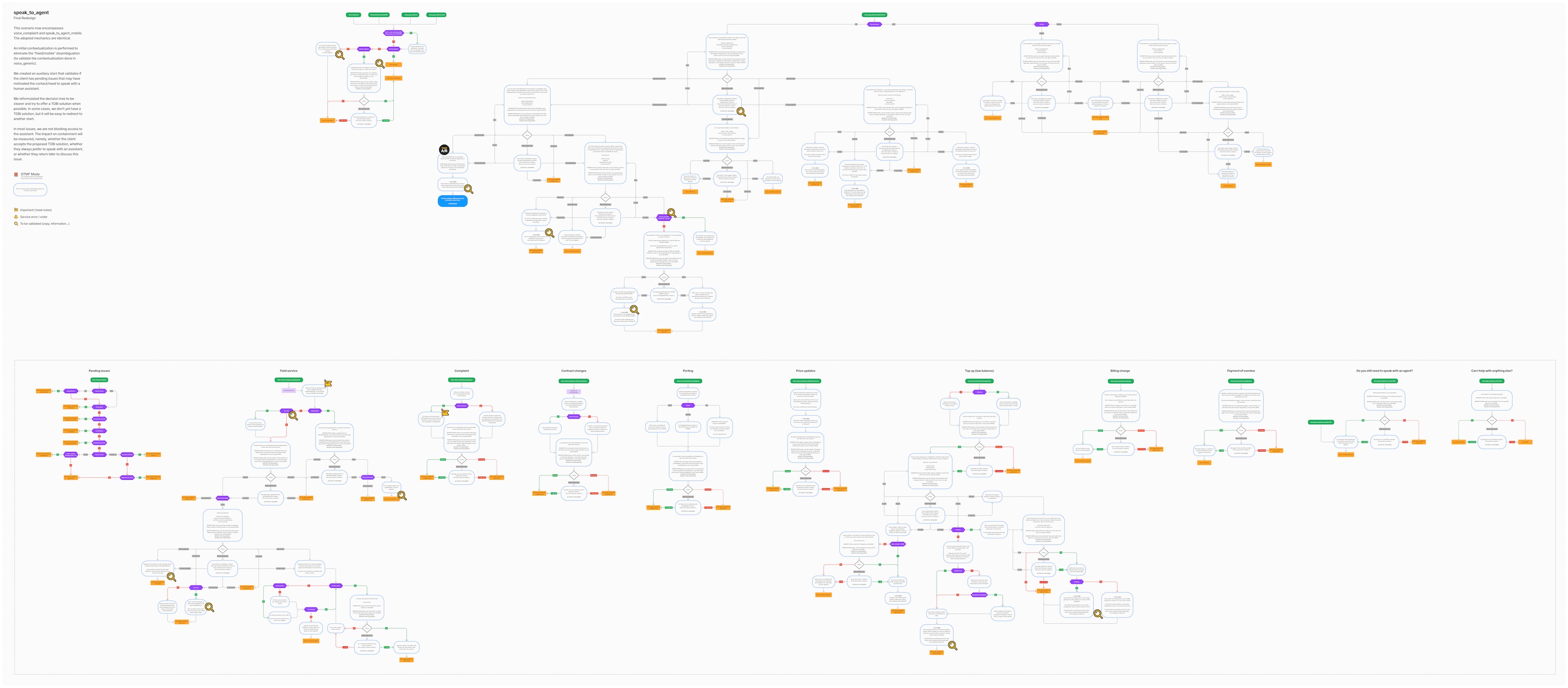
The original “speak with an agent” journey existed in 3 separate versions: one for mobile customers, one for home fiber customers, and a separate complaints journey that was very similar. The redesign consolidated these into a single modular journey.
The journey flow was designed in Figjam to facilitate collaboration of the UX team and external stakeholders.
We started by reviewing the use cases and edge cases, with a rule of 3 choices maximum to complete any task. We then mapped the interaction modules and how they connect, before writing and refining the copy with our UX writer. Each copy block was tested individually to check for TTS errors, and natural delivery. Voiceflow then let us hear the blocks in sequence through different paths, validating that everything worked together as a whole.
Low balance while roaming
Customer wants to speak to an agent. They're roaming and have a prepaid plan, with low balance.
Payment overdue
Customer wants to speak to an agent. They have unpaid bills, which could result in service suspension.
Proactive care
Most customers calling support have a pending issue, and that's likely why they're calling. TOBi identifies the customer from the phone number on file, or asks for their account number at the start of the call, then checks the account for issues ranked by urgency: bookings, complaints, contract changes, high billing, and more.
When there's a match, we ask if that's the reason for the call. If it is, we provide an immediate solution. If not, a short decision tree handles the major call drivers. Either way, after we've tried to solve the issue, the option to speak with a human agent is always available.
Engineer visit in progress
Customer wants to speak to an agent. The time window for a scheduled visit has already started.
Field service
If the customer has a visit scheduled, TOBi checks its status to see what actions are possible, like rescheduling, cancelling, or notifying the field service engineer. If the customer wants to reschedule the visit, they can book the next available booking over the phone. If they need more booking options, we channel switch to the web chat.
Complaint within SLA
Customer mentions they have a complaint. The complain was submitted, but it’s still being reviewed.
Complaints
When the customer’s intent specifically mentions a complaint, TOBi acknowledges the situation and checks for pending complaints and their status. If the Contact Center team is still reviewing it, we inform the customer. If the customer wants more information beyond the complaint status, we hand-off the call to an agent.
User feedback
The proactive care strategy was well received, particularly the field service scenario. The immediate match with what was needed created a wow moment: “TOBi is getting really smart!”
Testing showed this strategy improved user confidence in the system. Because TOBi's suggestions were always made in the customer's best interest, participants said they weren't bothered when the proactive check didn't match their reason for calling, even in the payment overdue scenario, where reminding a customer of unpaid bills is a sensitive topic.
Low balance while roaming
“This happened to me. I wasn’t sure how to top-up my balance while traveling.”
“It was easy to understand. Being able to speak to an agent is reassuring.”
Payment overdue
“It’s useful. I’d probably get an SMS about the unpaid bill. But it’s easy to miss those.”
“I didn’t mind it, because I can still choose to talk about something else.”
Ongoing engineer visit
“It’s very common to call support, to make sure the engineer is showing up.”
“I think I would still like to receive an SMS from the engineer to confirm they’re on the way.”
Pending complaint within SLA
“The timeframe for the reply is nice to know. But if I were in a hurry, I guess I would still want to speak to someone.”
Proactive care
“I think you should say this information right at the beginning of the call.”