
My role
Designing for TOBi meant working at scale, with millions of customer interactions and measurable business impact.
- Led a team of 2 designers, 1 QA analyst, and 1 UX writer
- Owned the process: research, analysis, and final design decisions
- Designed 20+ journeys for key drivers, like billing, sales, and troubleshooting
- Defined reusable design patterns for faster, more consistent journey design
- Improved target metrics: Containment > 80% + NPS > 60
Key insights
-
Position chatbot as a self‑service tool
Not as a gatekeeper to speaking with a human agent.
-
Generic responses feel unintelligent
Leverage account data to give specific, relevant answers.
-
Edge cases are inevitable
Keep journeys on track with context‑aware guidance and fallbacks.
-
Fluency and technical know‑how varies
Use plain language and illustrate concepts with examples.
Design process
The goal was improving efficiency and experience metrics. Journeys were monitored after launch, and measured against containment and NPS targets.
Step-by-step of the design process
-
-
Discover + Define Step 1: Discover and Define
-
New journey-
Stakeholder role:
Business requirements
-
UX team role:
Define use cases
-
Stakeholder role:
-
Journey redesign-
UX team role:
Audit current flow
-
Analyze customer logs
-
Map issues and opportunities
-
UX team role:
-
-
-
Design + Test Step 2: Design and Test
-
-
Stakeholder role:
External input
-
UX team role:
Design and prototype
-
Test usability
-
Iterate
-
Stakeholder role:
-
-
-
Implement + Validate Step 3: Implement and Validate
-
- UX team role:
-
Document
-
Hand-off
- Stakeholder role:
-
Implementation QA
- UX team role:
-
AB testFor journey redesigns
-
Measure KPIs
-
Working with the QA analyst, I analyzed anonymous customer logs to find where journeys broke down and why (surfacing gaps, edge cases, misalignment between the chatbot and human agents), often pointing to new feature opportunities.
Stakeholders were involved throughout: Customer Service QA checked compliance, Brand and Marketing covered sales and promotional journeys, and Development flagged technical constraints.
Featured journey
Troubleshooting
Many customers reached this journey via channel switch from phone support.
Customers should always stay on their preferred channel, but some tasks, like technical troubleshooting, benefit from visual support. Channel switching makes sense in those cases, however, it’s important to work towards channel parity, so customers can get the help they need on any given channel.
This journey authenticates the customer, surfaces known service issues, runs automated connection and equipment checks, and offers further troubleshooting or agent hand-off. A short NPS survey is shown at the end of the journey.
What wasn’t working:
- Service selection wasn’t obvious to all customers.
- False containment created by customers marking the issue as solved to end the troubleshooting.
- High abandonment, particularly at the advanced troubleshooting step.
- When automated tests fixed the issue, NPS was very high. When customers gave up, it was very low.

What changed
Service selection
Identifying the affected service wasn’t always obvious to customers. The redesign made service selection clearer and easier, with a simple way to switch if they'd chosen the wrong one.
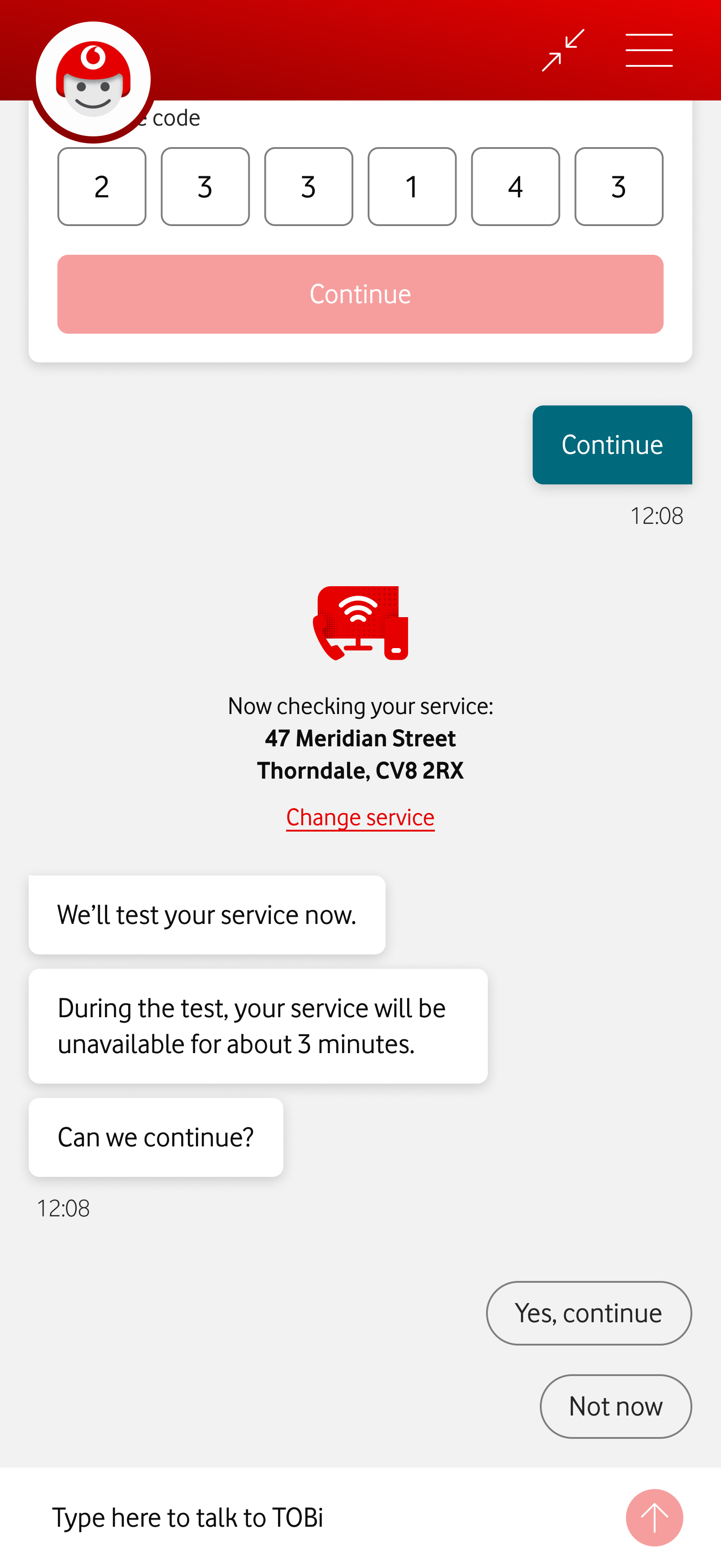
The customer’s service address is clearly visible, with a home fiber icon and a link to change the service. TOBi tells the customer they will test the service now, warning the service will be unavailable for about 3 minutes. TOBi confirms if it’s okay to continue. Near the chat input field, two reply suggestions appear, “Yes, continue” and “Not now”.

The user wants TOBi to start the service test. TOBi asks the customer to wait until the test ends. An animated Vodafone icon shows the test has begun. Below the icon, a label shows each step of the test: “Checking your connection… Restarting your router… Wrapping up”.
Automated tests
Automated checks ran in the background with little feedback. The redesign made each test stage clearer, so customers could follow the progress and understand what was happening.
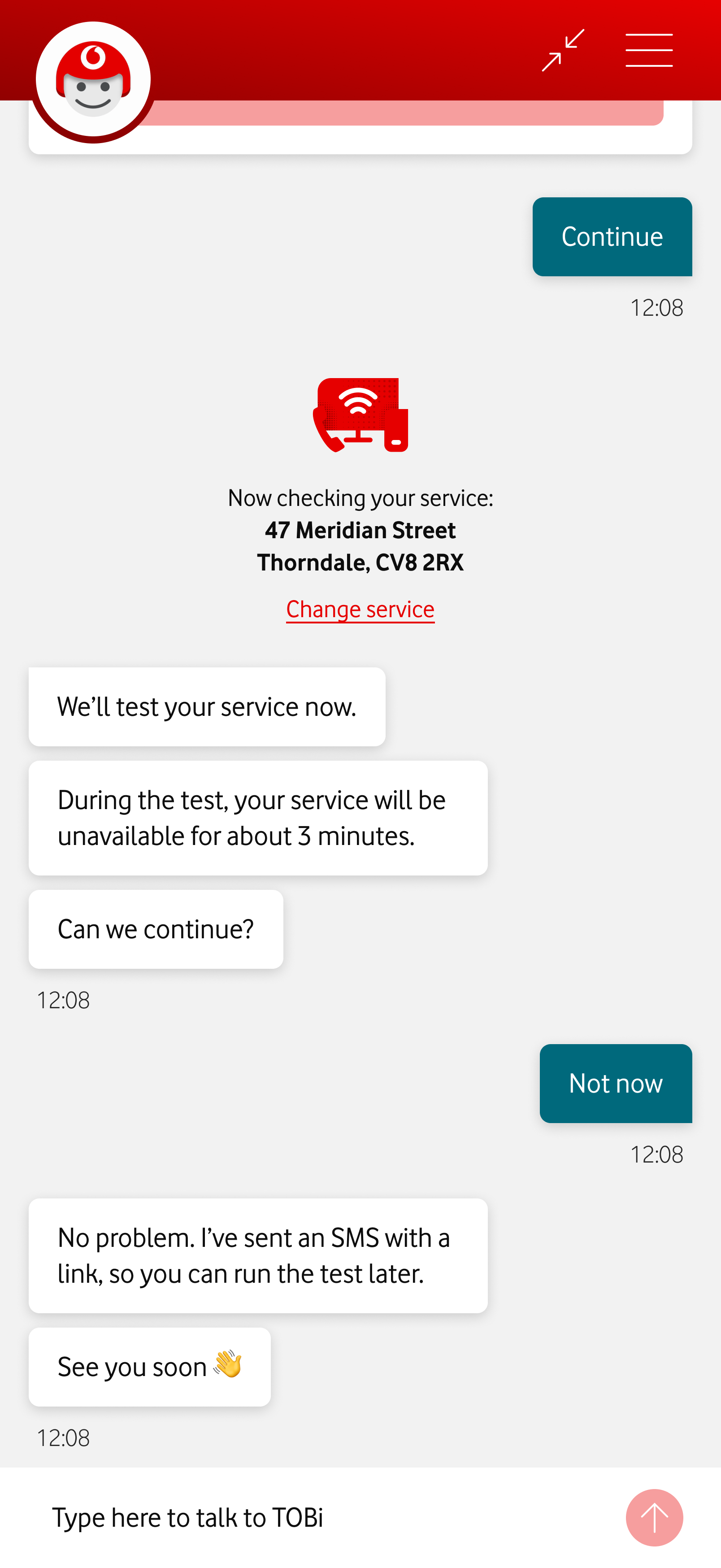
The customer asks to run the troubleshooting test later. TOBi informs the customer he's sent an SMS with a link to resume the test, and says “See you soon”.
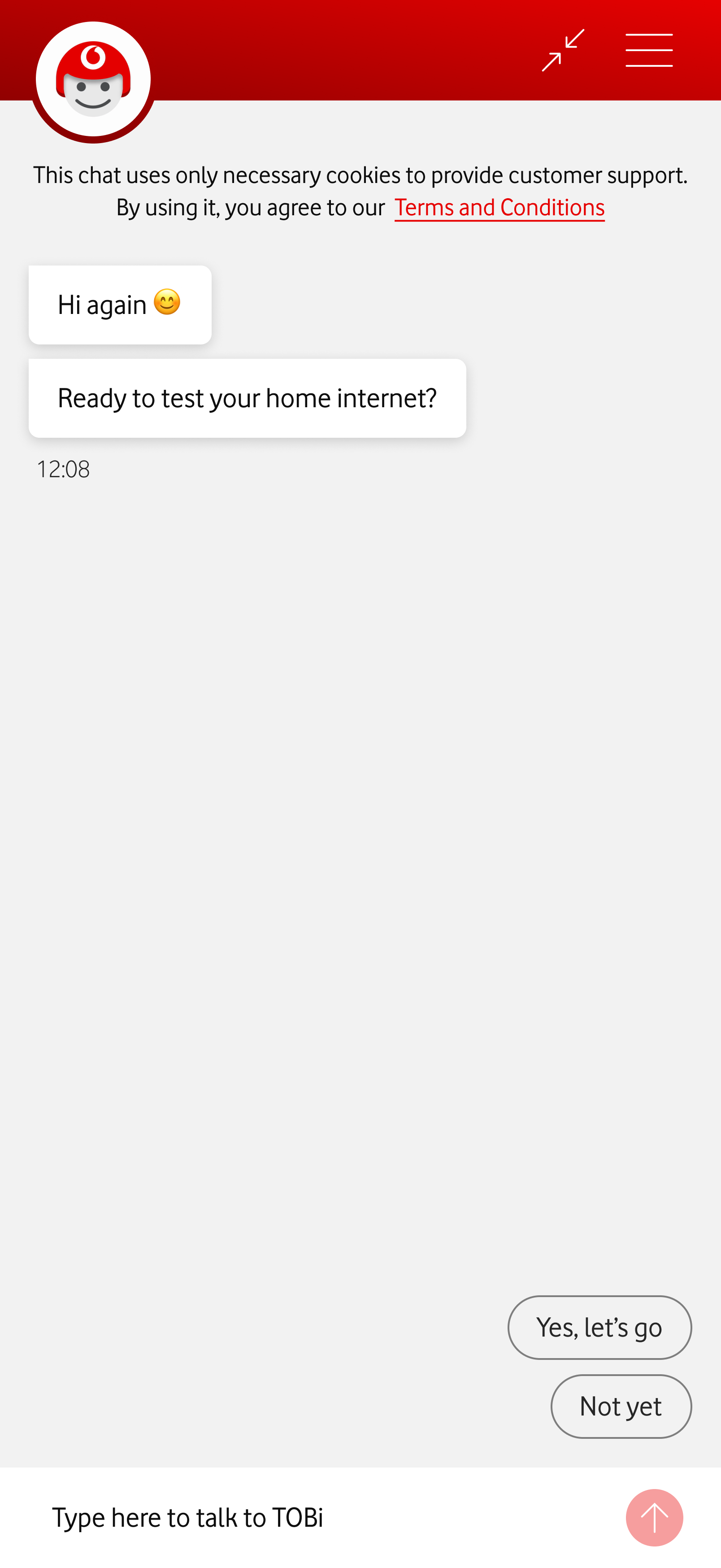
The screen shows TOBi Chat, after the customer followed the SMS link. TOBi asks if they are ready to test their home internet. Two chat suggestions read: “Yes, let's go” and “Not yet”.
Resume journey link
Customers who couldn't troubleshoot at the moment were told to return to the chat on their own. The redesign introduced a link, sent via SMS and valid for 48 hours, that picks up exactly where they left off.
If the customer does return on their own, TOBi will ask if they want to continue the troubleshooting either way. But the link reinforces the idea that they won’t have to repeat information.
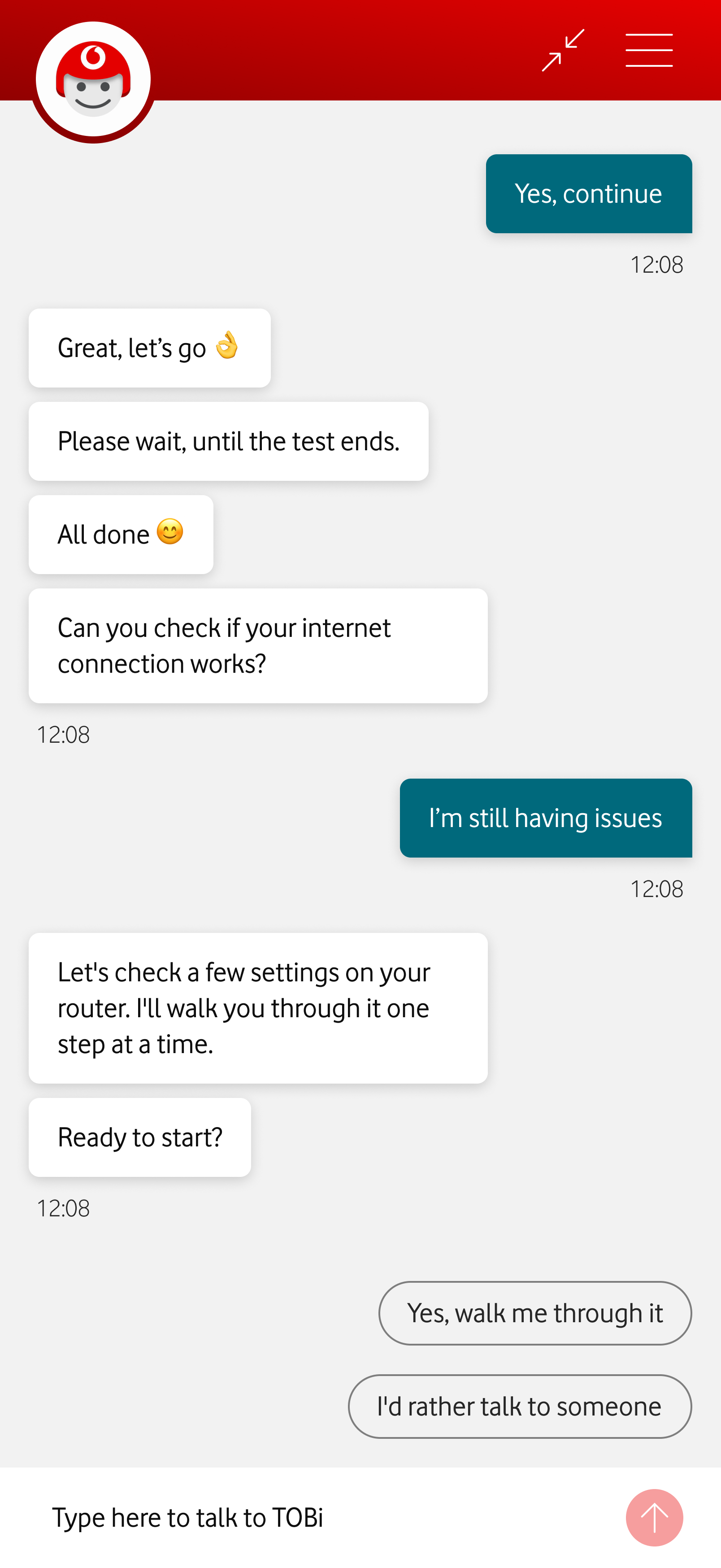
The customer is still having issues. TOBi offers to further help, by checking some router settings. Two reply suggestions appear: “Yes, walk me through” it and “I'd rather talk to someone”.
Optional troubleshooting
Complex steps were mandatory before agent hand-off was offered. The redesign makes them optional, with hand-off available immediately after the automated tests.
If the customer calls after completing the basic troubleshooting, they're connected directly to a human agent, avoiding the frustration of having to explain the issue again.
The customer says the issue is fixed. TOBi presents an NPS card. The customer gives a score of 6. Because the customer isn't completely satisfied, TOBi shows a feedback card. The customer fills in the information. TOBi then offers an agent hand-off.
NPS survey
Typed input led to frequent errors, corrupting the data used to measure journey success. Buttons with a deliberate submit step make the choice more intentional and the data more reliable.
We give dissatisfied customers the option to speak with a human. It’s a good opportunity to solve pending issues, and turn detractors into promoters.
User feedback
User feedback confirmed the changes were positive, but also pointed to possible improvements. This feedback informed future design iterations. It’s tempting to implement all feedback, but we were careful to always balance the information and features offered, so choices didn’t become overwhelming.
Service selection
“I can see what’s going on.”
“It told me that it’ll take 3 minutes, but how far along is it?”
Automated tests
“It’s clear what the address is.”
“Maybe ‘Change service’ could be a little bigger.”
Optional troubleshooting
“I don’t mind basic steps that I can do on my own, as long as they don’t take half an hour.”
“If I give up, can I still speak with someone?”
Resume journey link
“I like that I don’t have to start over, if I’m not at home, for instance.”
NPS survey
“I can choose if I want someone to call me or keep chatting here.”
“It would be nice if I could schedule a call, in case I can’t talk right now.”